
Assembly 101: How Programs Speak to the Machine
Sameera Madushan / December 22, 2025
Ever stopped to think about what actually happens when your program prints a simple message on the screen? High-level languages make it look like magic, but under the hood, your computer is juggling bytes, registers, and instructions, all talking directly to the CPU and the operating system. Sounds mysterious, right?
In this tutorial, we’re going to peel back the curtain. We’ll dive into a tiny Linux program written in x86-64 assembly and break it down line by line, so you’ll see exactly how those seemingly simple messages travel from your code to the screen. By the end, you’ll understand the magic at its most fundamental level.
A Peek Inside RAM: How Programs Live in Memory
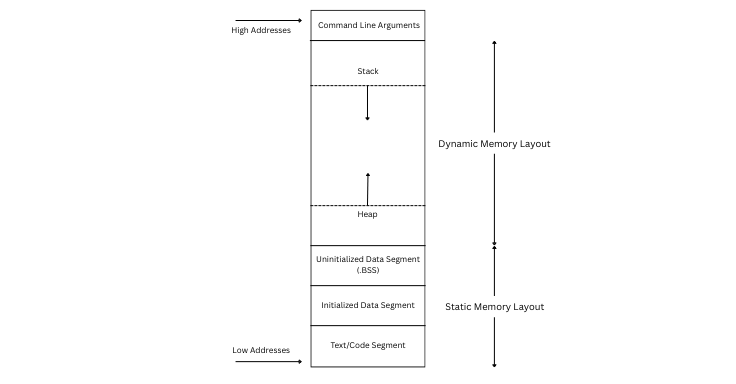
Before we dive into how assembly programs work, it helps to picture what’s happening in RAM while a program runs. When your CPU executes a program, it doesn’t just see a single “file”; it sees different regions of memory, each serving a specific purpose.
-
Text/Code Segment
- Holds the program’s machine code instructions.
- Read-only, fixed size, loaded at program start.
-
Initialized Data Segment
- Contains initialized global and static variables (like strings).
- Persistent, known at compile time.
-
Uninitialized Data Segment (BSS)
- Contains uninitialized global/static variables.
- Zero-initialized by the OS at load time.
-
Heap Segment
- Stores dynamically allocated memory (e.g., malloc in C).
- Grows upward during execution.
-
Stack Segment
- Stores function call info, local variables, and return addresses.
- Grows downward during execution.
When the program starts, the operating system loads the .text and .data segments into RAM and allocates space for the .bss segment, which is zero-initialized. The stack is set up at a high memory address, ready to handle function calls, while the heap begins just after the data segments and grows as the program requests dynamic memory. The CPU fetches instructions from .text and reads or writes data from .data, .bss, the heap, or the stack, depending on what the program needs to do.
Understanding this memory layout helps explain why certain assembly instructions use registers versus memory and why system calls require addresses and lengths. It also clarifies the difference between static data in .data and dynamic memory on the heap. Even a small program, such as one that prints a string, interacts with multiple parts of memory in a precise and coordinated way.
The Program
Here’s the small program we’ll dissect:
section .data
msg1 db "Learning Assembly", 10
len1 equ $ - msg1

section .text
global _start

_start:
    ; -------- print first message --------
    mov rax, 1
    mov rdi, 1
    mov rsi, msg1
    mov rdx, len1
    syscall

    ; -------- exit --------
    mov rax, 60
    xor rdi, rdi
    syscall
.data Section
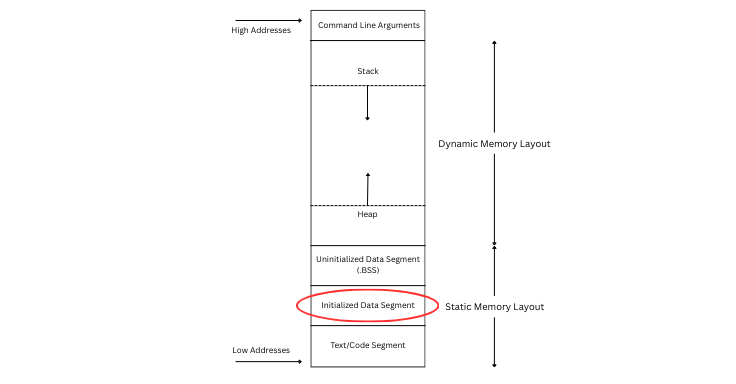
The .data section is where a program stores its initialized global and static variables, including strings and other messages. When your program runs, this section is loaded into memory so the CPU can quickly access the data it needs.
section .data
This tells the assembler:
“Start placing the following values into the data segment, where initialized data lives.”
Anything you define after this line until another section is treated as predefined data stored in memory when the program starts.
msg1 db "Learning Assembly", 10
msg1 is a label. It acts like a pointer or address in memory. When you reference msg1 later (for example, in mov rsi, msg1), the CPU knows exactly where the string starts in RAM.
db stands for Define Byte. It tells the assembler to store the given values in memory as bytes. Each character in the string occupies 1 byte in ASCII.
"Learning Assembly" is the string itself. It is stored in memory as a sequence of ASCII bytes, one byte per character.
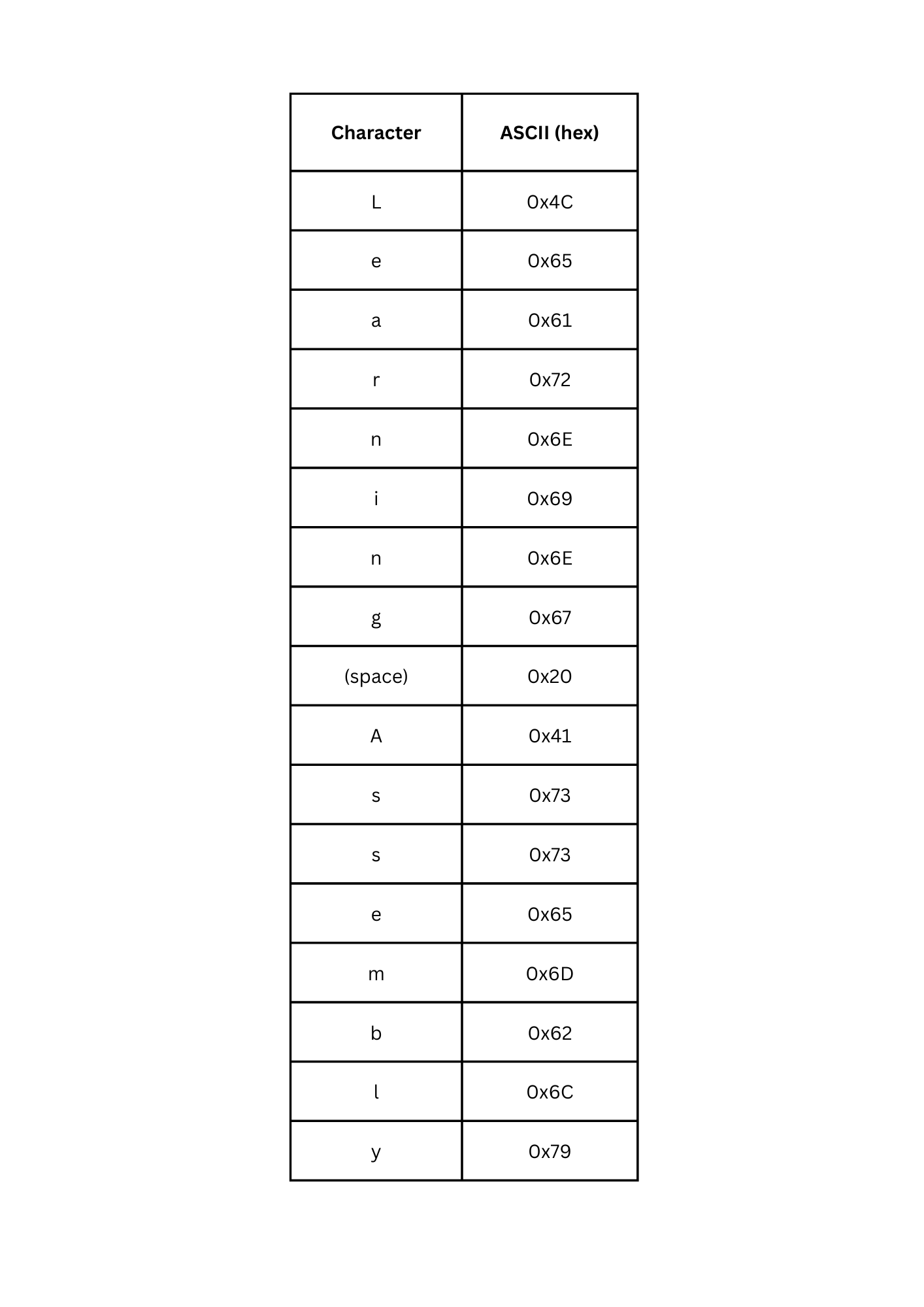
Decimal value 10 is the newline character (\n) in ASCII. It moves the cursor to the next line when printed.
Memory layout will now be:
'L' 'e' 'a' 'r' 'n' 'i' 'n' 'g' ' ' 'A' 's' 's' 'e' 'm' 'b' 'l' 'y' '\n'
So, in conclusion, we use a label like msg1 to reference the string’s memory location in instructions such as mov rsi, msg1. The db directive tells the assembler to store each character as a byte, since strings in assembly are not null-terminated by default like in C, and we need to explicitly provide the string length using len1. Including 10 at the end adds a newline, ensuring that the printed text doesn’t stay on the same line and making the output more readable.
len1 equ $ - msg1
len1 is a symbolic constant, which is a name that represents a fixed value in your code. It does not use memory (unlike a variable), and its value is known at assembly time. The assembler replaces the name with the actual value wherever it appears. In this case, len1 represents the length of the string in bytes.
equ short for “equate.” It tells the assembler: “Whenever you see len1, replace it with the value on the right-hand side.” This happens at assembly time, not at runtime.
$ represents the current address in memory while assembling. At this point, $ is right after the string ends.
$ - msg1 subtracts the start address of the string (msg1) from the current address ($). The result is the number of bytes from start to end, which gives the string length.
Example: How len1 equ $ - msg1 is calculated
Assume the string is stored in memory starting at this address:
msg1 → 0x100
String is:
"Learning Assembly" + newline
Let’s count bytes:
Learning Assembly   = 17 characters
newline (10)        = 1 byte
--------------------------------
Total length        = 18 bytes
So memory looks like this:
Address    Data
0x100      L
0x101      e
0x102      a
...
0x111      10 (newline)
After the last byte, $ now points here:
$ → 0x112
Now the calculation:
len1 = $ - msg1
len1 = 0x112 - 0x100 = 0x12
len1 = 18 bytes
.text section
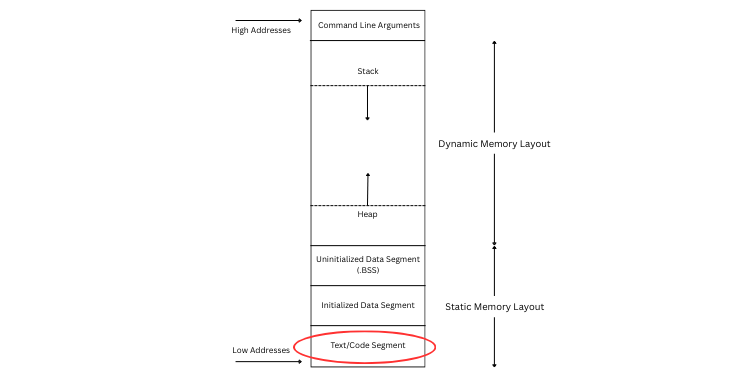
The .text section is where the program’s actual machine code instructions live. This is the part of memory that contains the CPU instructions your program will execute. It is typically marked as read-only to prevent accidental modification, and it is loaded into memory when the program starts so the CPU can continuously fetch and run the instructions stored here.
section .text
This tells the assembler:
Everything following this line goes into the text segment, where executable instructions live.
We need the .text section so the assembler and operating system can clearly distinguish between program code and data. The .text section explicitly marks where executable instructions live, while other sections like .data or .bss store variables and values. Without this separation, the assembler wouldn’t know what should be treated as instructions to run and what should simply be stored as data in memory.
global _start
global is an assembler directive. It tells the assembler to make the symbol _start visible to the linker as an entry point. In other words, _start can be seen outside this file, so the linker knows where to begin execution.
Why _start?
In Linux assembly programs without C libraries, _start is the default entry point. It tells the operating system where execution begins. We don’t use main here because main is part of C programs; without the C runtime (libc), there is no startup code, so _start is required.
How the Linker Uses _start
When you assemble and link the program using:
nasm -f elf64 prog.asm -o prog.o
ld prog.o -o prog
the linker looks for _start because you declared it global. If _start is missing or not global, the linker will throw an error saying the entry point is not found.
_start:
_start is a label in assembly. Labels act like bookmarks or pointers to a memory address, and the colon : marks it as a label. Since we declared global _start earlier, the linker knows to begin executing instructions from the address of _start.
Now that we’ve set up our data and entry point, here are the instructions that tell the CPU and OS what to do.
mov rax, 1
The mov instruction, short for “move,” copies a value into a register or memory location using the syntax mov destination, source.
In this example, rax is a 64-bit general-purpose register in x86-64 CPUs, and we move the value 1 into it.
In 64-bit Linux, system call number 1 corresponds to write, so this instruction tells the kernel that we want to perform a write operation.
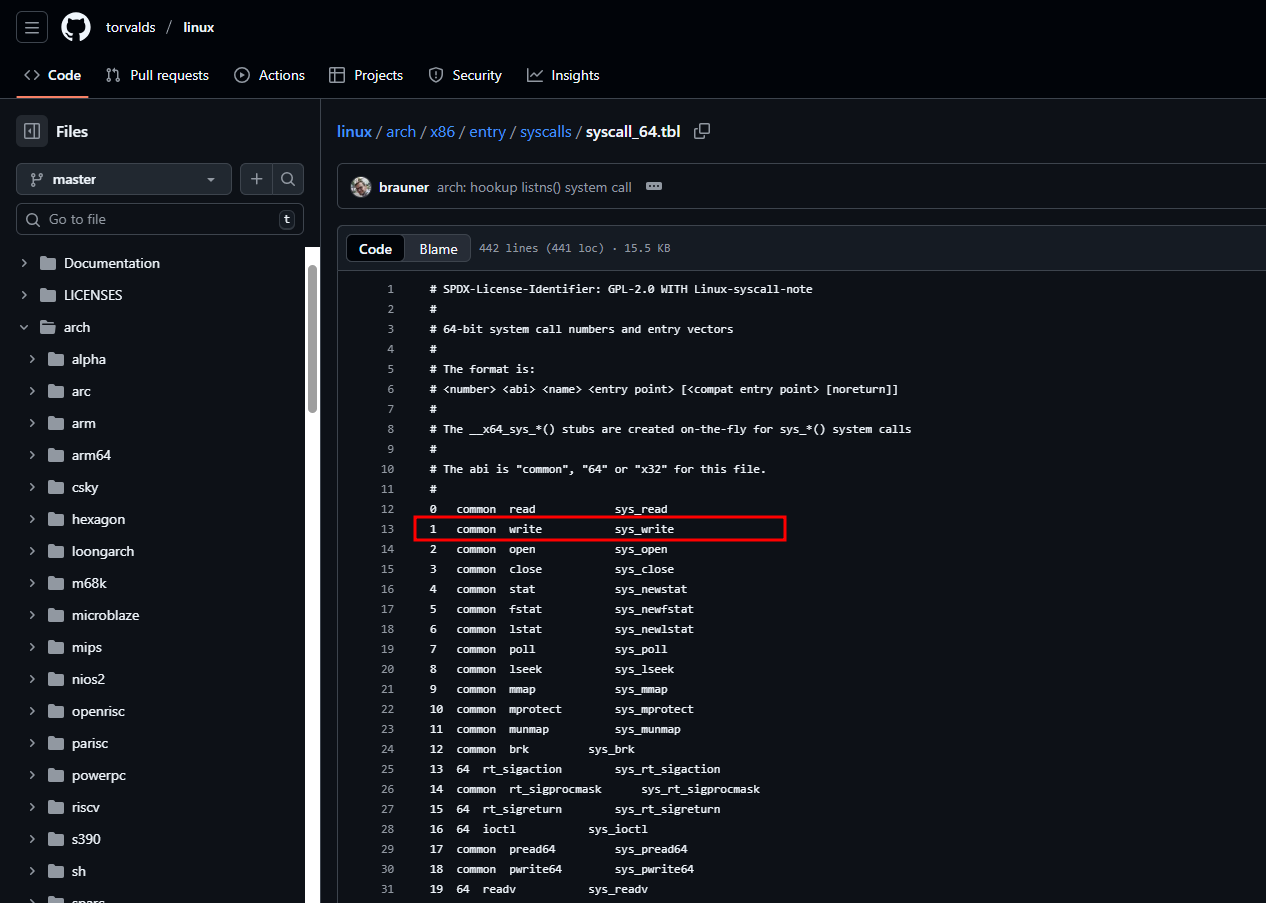
System calls in 64-bit Linux use registers to pass arguments: rax holds the syscall number, while rdi, rsi, rdx, r10, r8, and r9 hold up to six arguments.
To execute a syscall, you place the syscall number in rax, put the required arguments in the appropriate registers, and then execute the syscall instruction.
The write syscall
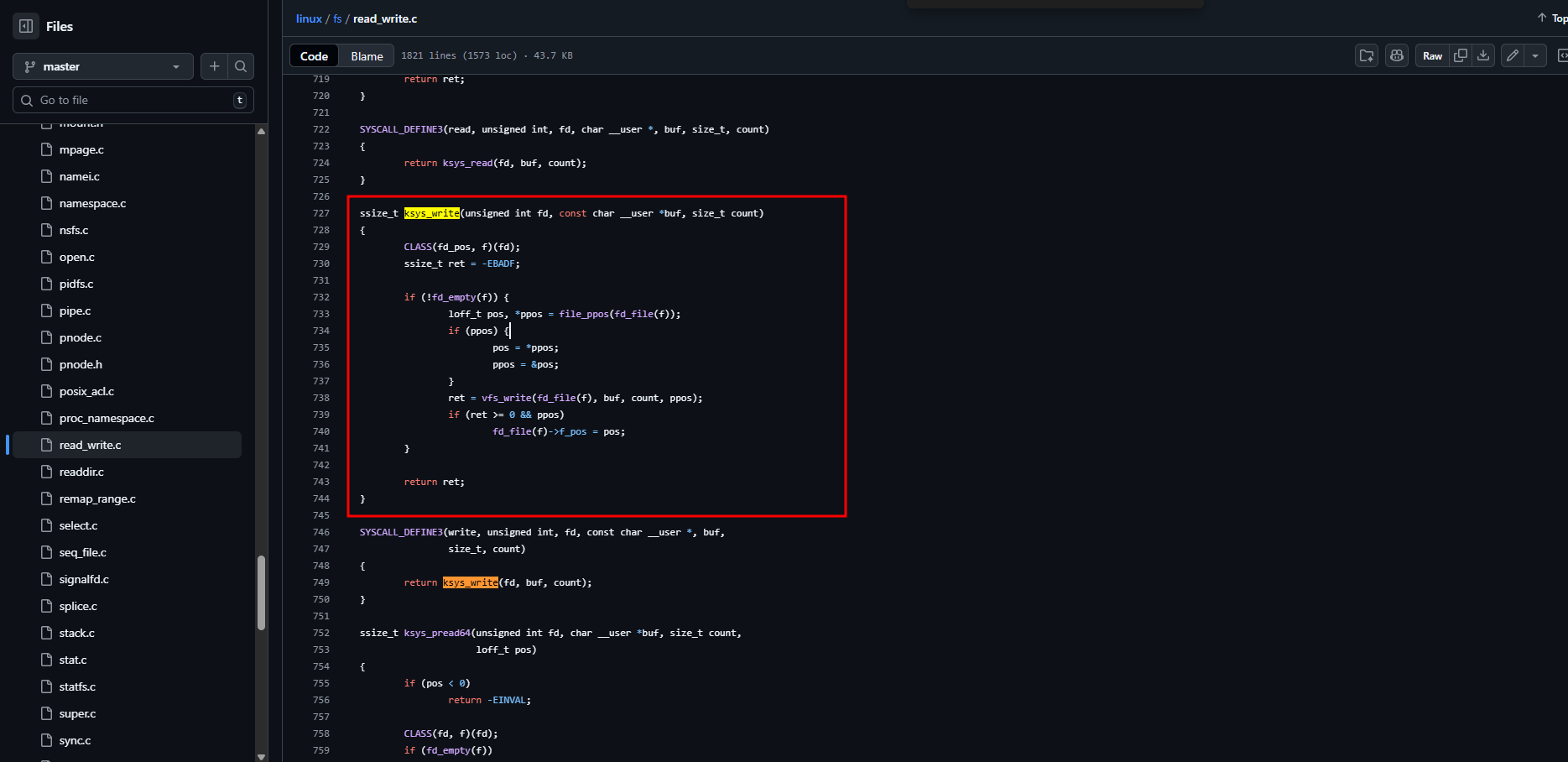
The write syscall in Linux is used to send data from a program to a file descriptor, such as the screen, a file, or another output stream.
The write syscall specifically takes three arguments:
- the file descriptor (fd) in
rdi - the buffer containing the data (buf) in
rsi - the number of bytes to write (len) in
rdx
mov rdi, 1
rdi is a 64-bit general-purpose register, and in 64-bit Linux system calls, it is used for the first argument. Moving the value 1 into rdi sets the first argument of the write syscall to 1, which corresponds to standard output (stdout), telling the kernel to write to the screen. In Linux, file descriptors (FD) identify where input and output go.
0 is stdin (keyboard), 1 is stdout (screen), and 2 is stderr (screen). Therefore, setting rdi to 1 ensures that the output of the write syscall is sent to the screen.
mov rsi, msg1
rsi is a 64-bit general-purpose register, and in 64-bit Linux system calls, it is used for the second argument. For the write syscall, the second argument is the buffer address, which tells the kernel where the data to print is stored in memory. msg1 is the label defined in the .data section, representing the starting memory address of the string "Learning Assembly\n". Thus, this instruction sets the second argument of the write syscall to the address of msg1, so the kernel knows which bytes to print.
mov rdx, len1
rdx is a 64-bit general-purpose register used in 64-bit Linux system calls to hold the third argument. For the write syscall, the third argument is the number of bytes to write from the buffer. len1 is a symbolic constant representing the length of the string msg1. This instruction sets the third argument of the write syscall to len1, telling the kernel exactly how many bytes it should print from the buffer in memory.
syscall
The syscall instruction in x86-64 tells the CPU to switch from user mode to kernel mode and execute a system call. Before executing syscall, the registers are set up with the required values: rax holds the syscall number (for example, 1 for write), rdi holds the first argument (fd = 1), rsi holds the second argument (buffer address), and rdx holds the third argument (length). When the instruction is executed, the CPU traps into the kernel, which reads rax to determine which syscall to run and uses the other registers as arguments. The kernel performs the requested service, such as writing data to the screen, and then returns a value, typically in rax, back to the program.
After printing our string, the program needs to exit cleanly. This is done using another system call, exit, which terminates the process and returns a status code to the operating system.
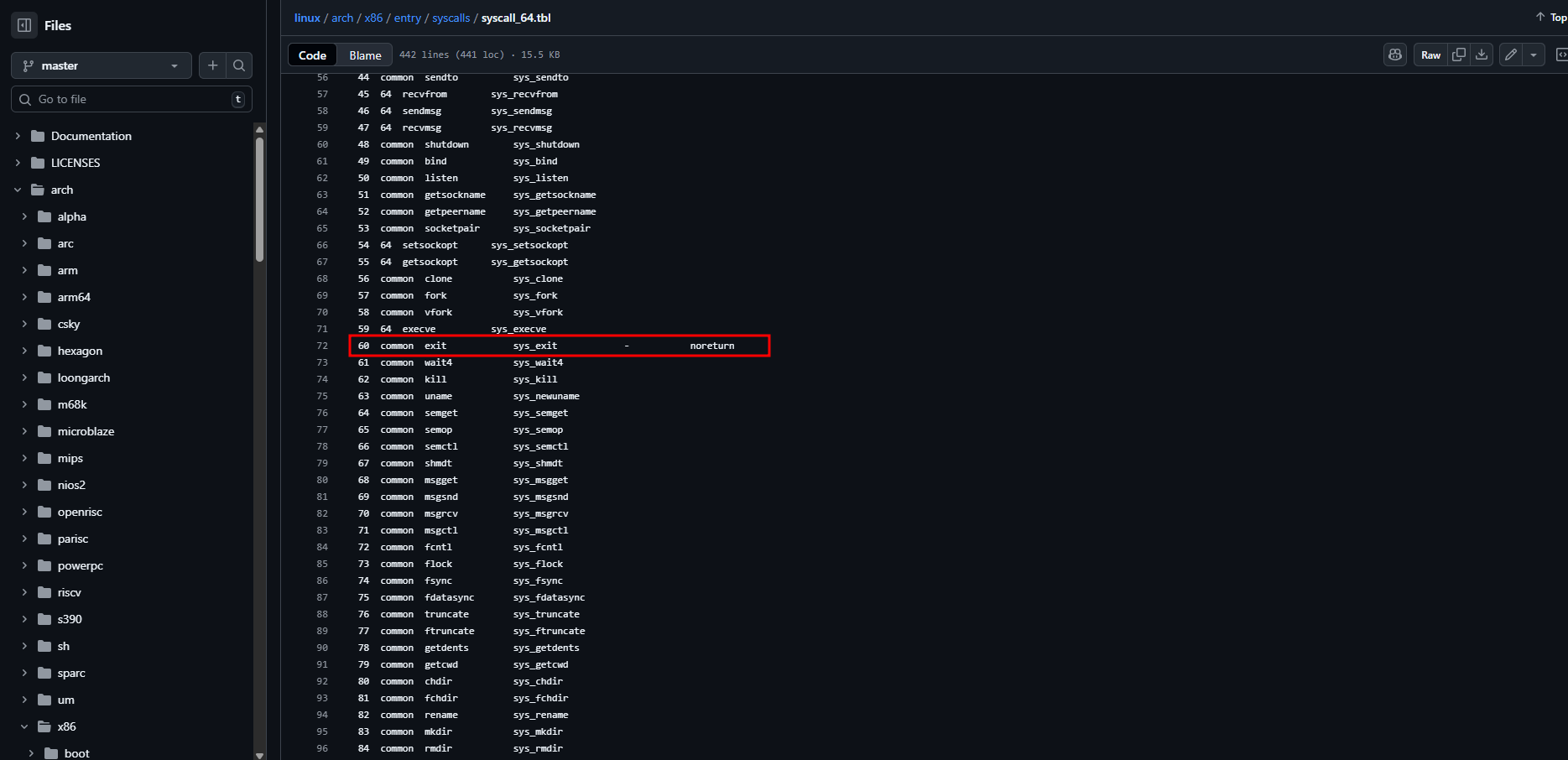
mov rax, 60
Here, rax is set to 60, which is the syscall number for exit in 64-bit Linux. This tells the kernel that we want to terminate the program. The arguments for this syscall are set in other registers (like rdi for the exit status) before executing the syscall instruction.
xor rdi, rdi
The xor instruction performs a bitwise exclusive OR between two operands. When you XOR a register with itself, every bit becomes 0, effectively clearing the register. In this case, rdi holds the first argument for the exit syscall, which is the program’s exit status. By executing xor rdi, rdi, we set the exit status to 0, indicating a successful program termination. This is a common and efficient way to zero a register in assembly.
syscall
Again the syscall instruction switches the CPU from user mode to kernel mode to execute the system call specified in rax. The kernel reads rax to identify the syscall (exit) and uses the value in rdi as the exit status. The kernel then terminates the process and returns control to the operating system.
Conclusion
Next time you write or run a program, remember that every action involves a carefully coordinated dance between memory, registers, and the CPU. What seems like a simple task like printing a string or exiting a program is actually a precise sequence of instructions, with each register and memory segment playing a crucial role. Understanding these low-level mechanics gives you a deeper appreciation of how software truly communicates with the machine.